Open budgets
Go to the Budgets screen. If you have not made any yet, this is where new ones live.
Guide · Budgets
Updated July 15, 2026 · Simply Finance
Budgets in Simply Finance are deliberately simple: plain per-category monthly limits, and nothing more. There is no envelope method to keep balanced, no money to assign, and no rules to learn. Each budget just shows what you have spent, what is left, and whether you have gone over. Here is how to set ones that actually hold up.
A budget in Simply Finance is one number attached to one category for one month. You decide that groceries should be, say, $400 this month, and from then on the app quietly keeps a running total: how much you have spent, how much is remaining, and, if you cross the line, how much you are over. That is the whole model.
Budgets are monthly. Each category tracks against its limit for the current calendar month and starts fresh when the month turns over, so you are always looking at where you stand right now rather than an accumulating balance.
If you have used YNAB or another envelope-style app, this is deliberately less machinery. There is no pool of money to hand out to categories, nothing to reassign when you overspend, and no running balance to keep zeroed. You set a monthly amount, you spend against it, and the app tells you where you stand. That is on purpose — the simpler the budget, the more likely you are to keep it.
Setting one up takes under a minute. You do not need to plan your whole month first — pick a single category that tends to get away from you and start there.
Go to the Budgets screen. If you have not made any yet, this is where new ones live.
Pick a spending category you care about — groceries, eating out, transport, whatever you want to keep an eye on.
Give it a monthly limit. Base it on what you actually spent last month rather than what you wish you spent.
Save, and it starts tracking immediately — spent, remaining, and over update as you log transactions in that category.
The most common way a budget fails is being set from hope instead of history. A grocery budget of $300 feels responsible, but if you spent $460 last month and nothing has changed, all it will do is show you red every month and teach you to ignore the number.
Start with three or four categories — the ones where your money actually moves — not a dozen. A short list you check is worth more than a complete one you avoid. And base each amount on last month’s reality: open your recent spending, see what a category truly cost, and set the budget a little above that if you genuinely intend to cut back, or right at it if you just want a line you will notice crossing.
Leave yourself an “everything else” buffer, too. You do not need a budget for every category. Cover the few that matter, let the rest be spending you simply log, and you will find the budgets that remain are ones you can take seriously.
The getting started guide walks through installing, adding accounts, and setting your first budgets in about ten minutes.
Every budget shows the same three-part picture, so a glance is enough. Spent is what you have logged in that category this month. Remaining is what is left before you hit the limit. And if you pass it, the budget flips to over and shows exactly how far past the line you are — it does not just vanish or reset.
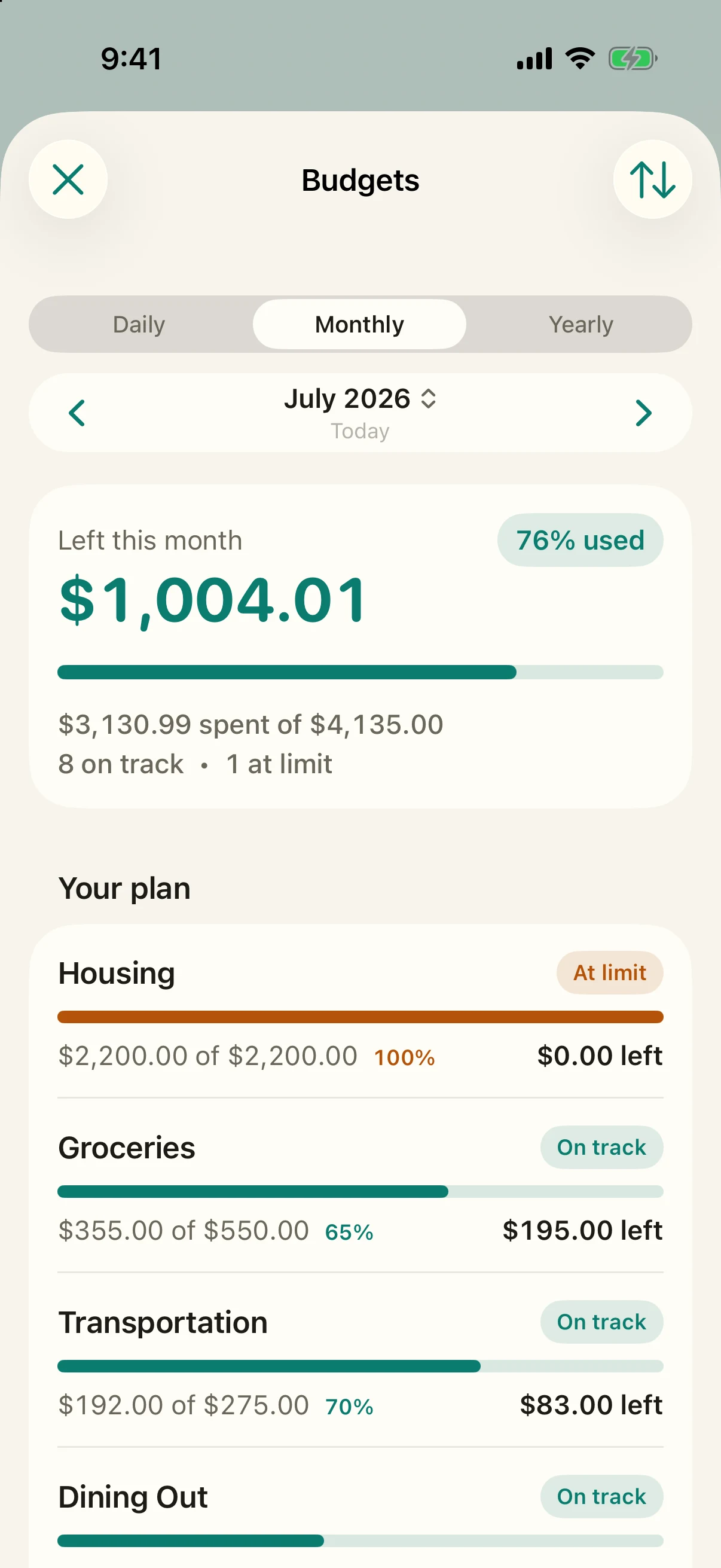
Because these numbers come from transactions you entered by hand, there are no surprises hiding in them — no pending charges, no miscategorized imports, no feed lag. What the budget says is what you logged.
Treat budgets as guidance, not guardrails. Nothing in the app locks when you approach a limit and nothing is blocked when you pass it — going over is information, not a failure. The point of the number is to make you notice, and once you have noticed you get to decide what to do.
So nudge them. If a budget was a guess that turned out low, raise it to match what the month is really costing. If a category has quietly shrunk, pull it down so the line stays meaningful. There is no penalty for changing an amount mid-month and no methodology that breaks when you do. A budget you keep adjusting to reality is a budget you will still be using in six months.
No. Simply Finance uses plain per-category monthly budgets — you set a limit and spend against it. There is no pool of money to assign to envelopes, nothing to reassign when you overspend, and no balance to keep zeroed. It is deliberately simpler than an envelope system.
The budget shows how far over you are and nothing is blocked. Going over is treated as information, not a wall — you still log the transaction, and the app simply makes the overage visible so you can decide what to do.
Budgets are monthly per-category limits: each category tracks against its amount for the current month and starts fresh when the month turns over. Keep it simple and think of a budget as “how much for this category this month” rather than a balance that carries forward.
Budgets are built for spending categories — the places your money goes that you want to keep an eye on. If you want to see income and how your balance is heading, that lives in your accounts and your forward-looking numbers on the home screen rather than in a budget.